ReservationKeyReservationKey
Pricing
DemoBook a DemoFree Trial
Log In
ReservationKey

Trusted by hospitality businesses since 2007

Founded in 2007, ReservationKey was created to offer a simple, yet powerful and affordable solution for managing reservations and displaying availability online. Our goal is to deliver top-quality software that fulfills our users' needs — simple, efficient, and budget-friendly.

Start Your Free TrialBook Your Demo

Solutions

  • Hotels & Motels
  • Bed & Breakfasts
  • Vacation Rentals
  • Resorts & Cabins
  • Campgrounds
  • Vehicle Rentals
  • Boats & Marinas
  • Ranches & Lodges

Resources

  • User Guide
  • Video Library
  • Blog
  • Articles
  • Onboarding Service
  • Terms of Service
  • Privacy Policy
  • Contact Us

Copyright © 2007 - 2026 ReservationKey, LLC - All rights reserved.

support@reservationkey.com|+1.415.800.4905

RESOURCE LIBRARY

  1. Home
  2. >Blog
  3. >New in ReservationKey: HTML Email Templates, Click-to-Edit Emails, and Date-Based Text

ReservationKey Blog

Product updates, practical hospitality tips, and setup strategies from our team.

Browse by category or archive

Search

Categories

  • Operations (119)
  • Announcements (31)
  • Automation (20)
  • Payments (20)
  • Design (16)
  • Reporting (14)
  • Integrations (11)
  • Hospitality Tips (2)

Archive

2026
  • New in ReservationKey: HTML Email Templates, Click-to-Edit Emails, and Date-Based Text
  • ReservationKey vs. Mews: Why I Like to Keep Booking Simple
  • ReservationKey vs. WebRezPro: A Simpler Choice for Small Properties
  • Tracking ReservationKey Bookings as GA4 Ecommerce Purchases
  • Introducing the New ReservationKey Website Builder
  • Pricing & Configuration Just Got a Major Usability Upgrade
  • Scheduled Emails: Automated Guest Messaging with Better Visibility and Reliability
  • What's New in ReservationKey (April Update)
  • Flexible Email Template Editing: Visual Editor, Raw HTML, and Legacy Support
  • How to Modernize Your Existing Reservation Pages
  • New Modern Booking Page Themes
  • New Media Library for Image Management
  • Members-Only Booking Pages with ReservationKey
2025
  • Introducing V3: A Cleaner, Simpler, and More Modern Look for ReservationKey
  • Updated Availability Calendar Reports in ReservationKey
  • Details of ReservationKey’s New Referral Rewards Program
  • Introducing Our New AI Chat Support Tool: Faster Answers, Smarter Help
  • A Complete Guide to the New Reservations Tab in ReservationKey
  • How to Setup and Use Passkeys for Easy Logins
  • New Data Layer Makes it Easy to Add Reservation Data to Tracking Code
  • Creating a Custom Theme Tutorial
  • Adding Search Bar to WordPress / Elementor With ChatGPT's Help
  • Introducing Text Messaging
2024
  • New Slideshow Format Now Available
  • New Theme Available
  • New Sign-in Options
  • NEW: More control over iCal reservations
2023
  • UPDATED: PayPal Payment Method SmartButtons
  • NEW FEATURE: Currency Conversion Widget
  • NEW: Rate adjustments can be set to apply only for last minute reservations
  • NEW: Alert icons in Guests section
2022
  • NEW: Automatically Add QR Codes to Gift Certificates
  • NEW: Exclude dates from discount codes
  • Selling Gift Certificates with ReservationKey and Square
  • NEW: Set date range restrictions on fees.
  • NEW: Set default length of stay for booking engine
  • Square API Update News
  • NEW: Show Custom Fields Specific to Selected Rooms/Units
  • NEW: Electric Meter Calculator in Items for Sale
  • NEW: Password protect online reservation pages
2021
  • NEW FEATURE: Flag rooms as dirty or clean
  • NEW: Fully customizable internal contact form in Reservation Details, including set which fields are required
  • NEW: Online Check-in Form; Signature Fields; Image Uploads
  • Two new custom field types – image/document upload & signature pad
  • NEW: Make card-present transactions with Square Terminal
  • ReservationKey for a Boatel (boat-hotel) – interesting uses of the reservation software
  • Channex updates, news, pricing
  • Big Update to iCal – Cancellations and Modifications now possible; new “import all” options
2020
  • NEW: Reservation status can automatically change after X number of hours
  • Improvement to online reservations page functionality
  • Appointment Bookings & Book by Type Tutorial
  • Creating Clickable Maps to Show Availability
  • How to completely edit the waiting list/inquiry form and message.
  • NEW OPTION: Set default number of guests
  • NEW: Custom field for currently logged in user
  • NEW: Online Modifications (and Cancellations)
  • New Feature: Easily Set Weekly and Monthly Rates
  • Customizing the ReservationKey Booking Engine for Your Needs
  • Options for Offering Trip Insurance
  • NEW: Online cancellations
2019
  • Themes updated with gift certificate styling
  • eRentalLock integration
  • ORBIS Research notes ReservationKey a “key player” in our industry
  • Stripe Integration
  • NEW FEATURE: Stripe Integration
  • Expedia Integration Update
  • Just launched – Stripe Integration!
  • New Website Under Development
  • NEW: Use merge codes to add website messages to email templates
  • New Connection: Quickbooks Online – feeback/testing requested
2018
  • What steps should I take prior to “going live” with my new ReservationKey account?
  • Answer to commonly asked questions from clients coming from Webervations and Rezovations
  • NEW OPTION: Create a fee that is a percentage of the room price
  • IDEA: Creative placement of booking engine
  • Six New Reservation Page Themes
  • NEW: Select what payment category to use for initial online payments.
  • HOW TO CONVERT A TELEPHONE OR EMAIL INQUIRY INTO A BOOKING
  • NEW FEATURE: Set user permissions from within the room/unit settings
  • NEW: custom fields numbers drop down
  • NEW FEATURE: Multiple Rate Plans Per Room/Unit
  • NEW FEATURE: Daily Activity by clicking date bar
  • New: Drag and drop reservations
2017
  • Updated Correspondence Window
  • NEW ENHANCEMENT: Easily view your ADR and RevPar
  • NEW FEATURE: Click to call
  • NEW FEATURE: Change the order of guest names
  • NEW FEATURE: send email automatically when changing reservation status
  • NEW: Reports menu has been redesigned
  • NEW FEATURE: Track when emails were opened
  • NEW FEATURE: Set rates & minimum stay day by day in Rate Plans
  • New feature: include room/unit specific details in email templates
  • Introducing the new search bar
  • Floating top scroll bar & more dates
2016
  • Easier to select Rate Plans that Taxes and Fees apply to
  • New Feature: Bookkeeping
  • Under Development: Update to system look and feel
  • New Quick Quote Feature
  • Option to force new login for an account user
  • HTML Editor Added to Email Templates
  • Update to Google Analytics Tracking Options
  • Break Address Field into Multiple Fields
  • New Feature to Show Minimum Stay Requirements on Internal Calendar
  • New Option For Adding/Removing Emails to Queue
2015
  • Import Credit Card Details From Myallocator Now Available
  • New Option for Splitting Address into Multiple Fields
  • New option in Reservation Status to set rates to zero
  • Forum assistance: Improvements to Pre-Book Links
  • Forum assistance: Prebook Guests and Send a Link to Collect Reservation Details/Payment
  • Forum assistance: Now Specify Number of Children Per Room
  • Forum assistance: ReservationKey Change Log Added
2014
  • New Responsive Design for Reservation Details
  • A Couple New Permissions Settings
  • Payment Pages now include terms agreement section
  • New Authorize Only, Void, Capture options for authorize.net and RentPayment
  • Enhancement: Bulk Print Now Can Create and Email PDFs
  • NEW: Automatically track commissions due from myallocator.com bookings
  • Drag Across Dates to Select Multiple Days
  • Innrewards.com – new directory site created by ReservationKey users
  • Review of Forum Updates
  • Update Themes
  • New MyAllocator Option for Room Type Matching
  • MyAllocator Modifications
  • Time Zone Setting for Public Reservation Pages
2013
  • Enhancement: Reservations Tab Saves Search Settings
  • Advice on Vacation Rental Email Correspondence
  • TripAdvisor TripConnect Certification Complete
  • New Feature: Filter by Amenities in Online Reservation Pages
  • New Feature: Create Bookmarks, Notes in ReservationKey
  • New Feature: iCal Import and Export Links
  • Set up Reservationkey’s TripAdvisor TripConnect link
  • Enhancement: Balance shows in reservation info box; information about IE Compatibility View
  • New Feature: Reminders
  • Enhancement: Hover over stars to see description
  • New Feature: {{roomurl}}
  • Updates to User Community Forum
  • New User Forum
  • New Events Bar on Top of Internal Calendar
  • New Bulk Printing Option
  • New Occupancy and Tax Reports
  • New Features Update
  • New Partnership With Channel Management Company
  • CC and BCC fields added to Send option in Correspondence Button
  • Update to ReservationKey Facebook Apps
  • A Few Enhancements – Items for Sale and Min Stay Error Messages
  • Slight Change Calendar Header Functionality
  • Change Status/Add Star(s) Automatically if Discount Code Used or Item for Sale Added
  • New Mobile Version – Easy to Setup
  • Require Consecutive Night Stays
  • New Google Analytics Features
  • Link Email Messages to Payment Methods
  • Items For Sale Enhancement
  • More Status Options; Keeping Rates on Room Changes
  • Captcha Option for Gift Certificates
  • Color Code Units; Search by Room/Unit
  • New Features for Property Managers
  • New Option for Displaying Cancellation Policy
  • New Internal Availability Search Feature
2012
  • Happy New Year (and a few new features)!
  • Quicker Access to Calendar
  • Steps For Using Alternate Rate Plans
  • Update to Search Forms
  • New Features in Email Templates
  • Adding ReservationKey’s Online Bookings to Your Website
  • Getting The Most Out Of ReservationKey
  • New Option For Disabling Online Bookings
  • A Few Upgrades in Gift Certificates
  • Enhancements to the Correspondence Window
  • ReservationKey Is Also For Property Managers!
  • Option For Scrollbar at Top of Availability Calendar
  • Easier Linking Settings to Reservation Page(s)
  • New Statistics Report
  • Configuring ReservationKey for Hotels, Motels, Campgrounds
  • Easier Configuration for Hotels, Motels, Campgrounds
  • New Feature: Scheduled Emails
  • Changing/Moving Reservations Now Much Easier
  • Updates to Payments by Date Report
  • More Options in Email Templates
  • New Feature for Holding Rooms for Groups
  • Rate Adjustment Specials Now Show on Hotel Style Pages
  • Two New Email Template Codes
  • Using the Search Form and Iframes
  • All About PayPal Subscriptions For ReservationKey Service
  • Highlight Reservations By Adding a Star
  • A Few CSS Tweaks
  • Improvement on Retaining Prices When Changing Reservation Dates
  • Nice Review From a User
  • Thoughts on Phone Support vs Email
  • New Features in Activity Tab
  • Preference Setting For New Reservation Alert
  • More Flexibility Using Themes and Custom Text
  • Why Switch to ReservationKey?
  • New Color Coding in Activity Availability Search
  • NEW FEATURE: Create Custom Reservation ID Numbers
  • Added Status Column to Payments by Date Report
  • Clicking Payments Saves Credit Card Info
  • New Tax Option For VAT Included
  • New Flexibility in Taxes on Items for Sale and Fees
  • Press Enter To Search
  • New Option to Include Tax on Percentage Items for Sale
  • New Alert If Auto Payment Does Not Complete
  • Arrive Depart in Calendar Search Mode
  • New Guestbook Spam Prevention
  • New Internal Messaging System
  • Fees and Items for Sale Line Items
  • How to Create Dropdown Field for Check-in Time
  • New Tax Merge Codes in Templates
  • New Internal Title Field for Templates
  • No More Accidental Deletion of Admin User
  • Re-Designed Print Version of Housekeeping Reports
  • Updates on Features and News
  • Tips on Authorize.net Integration
  • New Yearly Comparison Report
  • More Ways to Find Reservations
  • Two New Income Reports
  • Alternate Payment Schedules
  • A Few New Features
  • ReservationKey Facebook Apps
  • Do You Need Your Own SSL Certificate?
  • Reasons Why People Switch to ReservationKey
  • San Poncho, Mexico – Best Clients Ever
  • Red Flag Guests / Set Alert
  • Monitor Searches on Reservation Pages
  • New Waiting List & Inquiry Form
  • Luxurious B&B In San Poncho, Mexico
  • Punta de Mita, Mexico – The Utmost in Relaxation
  • On The Road, in Puerto Vallarta, Mexico
  • Automatically Reduce Minimum Stays
  • Converting to ReservationKey – Importing Data
  • Happy New Year and A New Feature
2011
  • Hotel Style Reservation Pages
  • Data Backups
  • A New Blog
  • More Star Choices For Marking Reservations

Announcements | October 4, 2026 | 5 min read

New in ReservationKey: HTML Email Templates, Click-to-Edit Emails, and Date-Based Text

Create guest emails from your own HTML or AI-generated designs, edit rendered emails in Correspondence, and add text that matches each reservation's dates.

emailautomationproduct-updates

You now have more ways to create and personalize guest emails in ReservationKey. Paste in an HTML design—including one created with AI—preview it, add merge fields, and make quick text changes before sending. You can also add text that appears only when a guest’s reservation falls within the dates you choose.

These features are now available in Email Templates and Correspondence.

Bring your own email design—including one created with AI

Want a more polished confirmation email, pre-arrival message, or welcome letter? You can now paste HTML directly into an email template using Edit as HTML.

This makes it easier to use a design you already have, work with a designer, or ask an AI tool to create a starting point. For example, you could ask:

Create an HTML pre-arrival email for a small waterfront resort. Use a simple, mobile-friendly layout with a welcome message, check-in information, and a section for things to do nearby. Use inline CSS suitable for email.

Once you have the HTML:

  1. Open an email template in ReservationKey.
  2. Choose Edit as HTML.
  3. Paste the HTML into the editor.
  4. Click Preview & edit text to see the design.

You can then refine the wording in the preview and add ReservationKey merge fields to personalize the message.
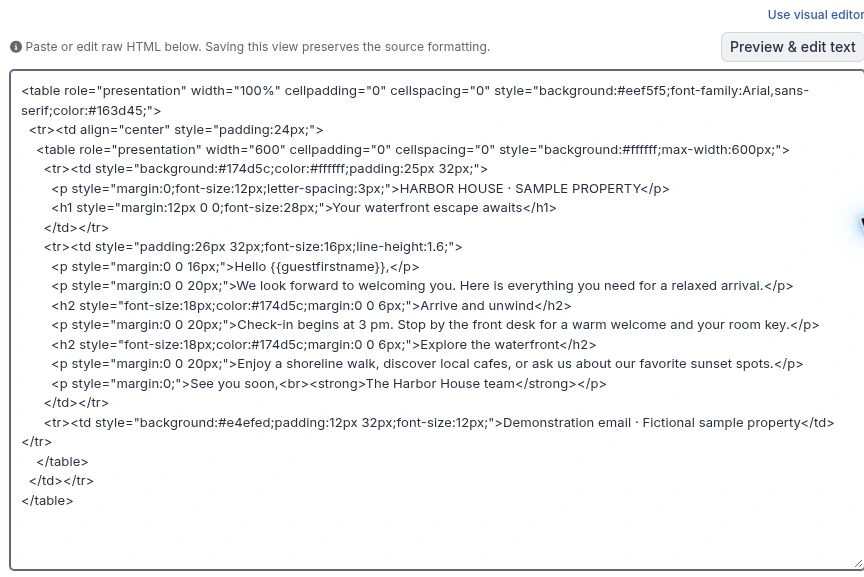
HTML source editor with a sample Harbor House email and the Preview & edit text button at the upper right.
1. Paste your email HTML, then choose Preview & edit text at the upper right.

Preview your design and add merge fields

You don’t need to find the right spot in the HTML source every time you want to change a sentence or insert a guest’s name.

In Preview & edit text, click the text you want to change and edit it directly. To add a merge field, click where it should appear and choose a field from Insert merge field.

This lets you combine a custom design with the guest and reservation information already stored in ReservationKey. Create the layout first, then add the personalized details where they belong.

Close the preview and save the template when you’re finished. Before using a new design for guest communications, send yourself a test email to check how it looks in your inbox.
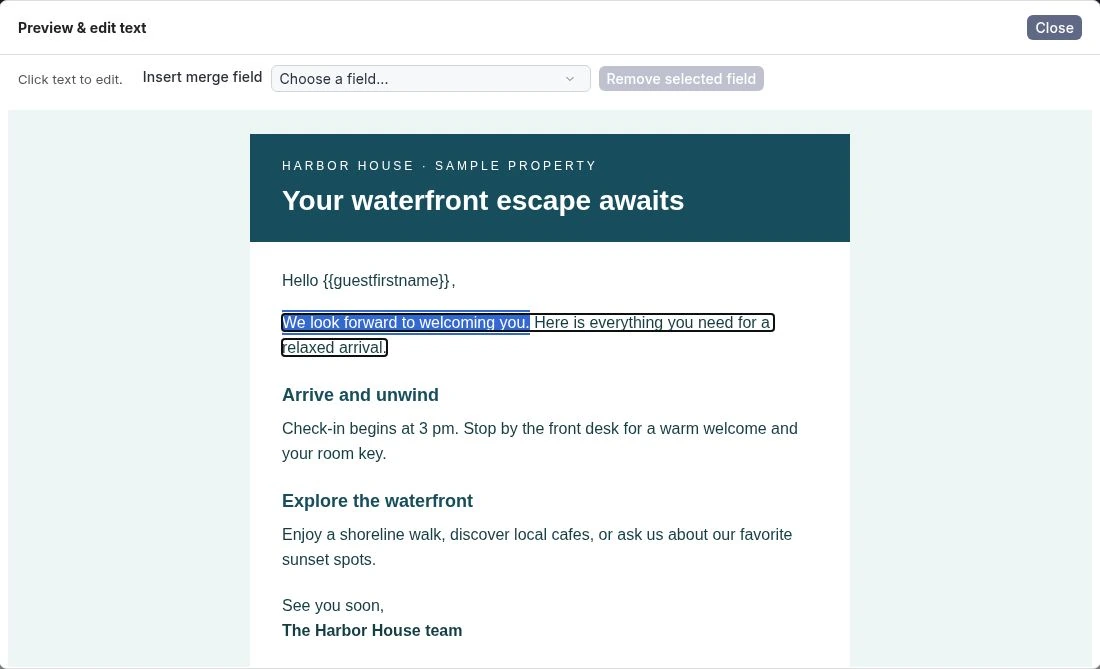
Rendered Harbor House email preview with a welcome sentence selected and the Insert merge field control above the email.
2. Select text to edit the rendered email. Use the Insert merge field control above the preview to add personalized details.

Make quick changes in Correspondence

When you select a template saved in HTML mode in Correspondence, ReservationKey displays the rendered email right away.

Need to add a personal welcome, clarify an arrival instruction, or adjust a sentence for a particular guest? Click the text and make the change directly in the displayed email.

You can see the design while you work, making it easier to review the message and personalize it before sending.
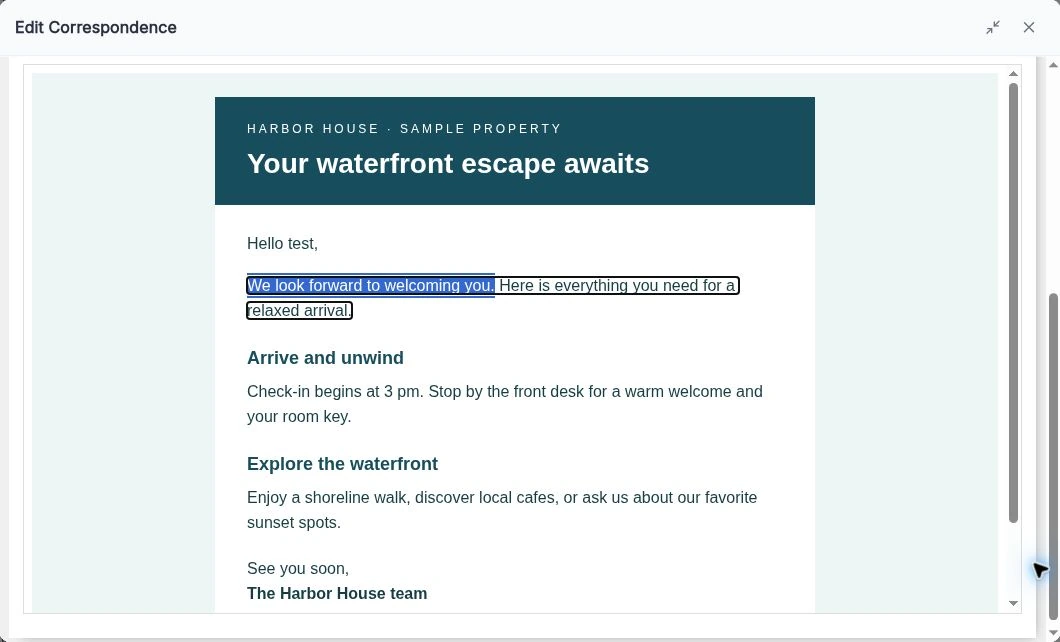
Edit Correspondence showing a rendered sample email addressed to test, with a welcome sentence selected for editing.
3. In a test reservation’s Correspondence, select a sentence to personalize the rendered email before sending.

Include the right information for the guest’s dates

Some information belongs in every email. Other details only matter during a particular season, holiday, or event.

The new Additional Text section in Email Templates lets you create reusable blocks of text with date-based rules. For example, you could include:

  • Holiday activities for guests staying over December.
  • Seasonal arrival instructions for winter visits.
  • Checkout information for guests departing during a special event.

Each block has a name, start and end dates, a matching rule, and its own formatted content.

Choose the rule that fits:

Matching ruleWhen the text appears
Staying during these datesAt least one occupied night falls within the range. Checkout day is excluded.
Arriving during these datesThe arrival date falls within the range.
Departing during these datesThe departure date falls within the range.

Start and end dates are inclusive. Dates include the year by default, or you can select Repeat every year for recurring information—including a range that runs from December into January.
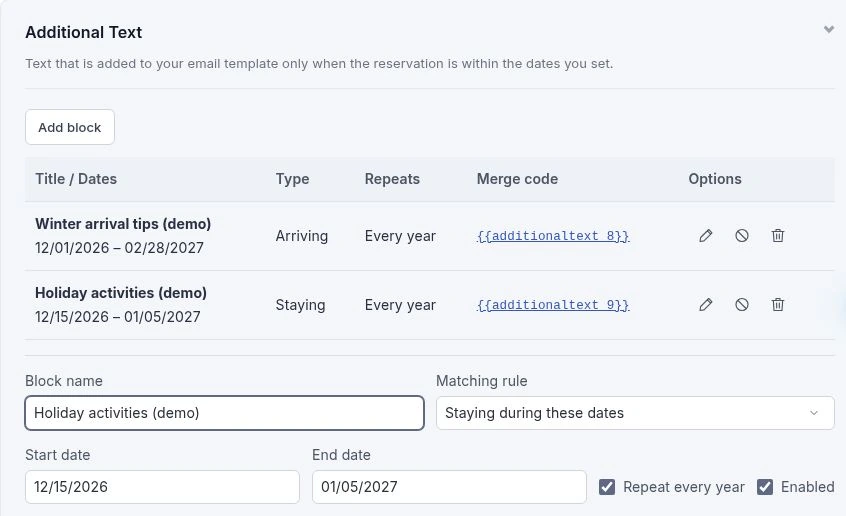
Additional Text with Winter arrival tips and Holiday activities demo blocks, plus matching rule, dates, and Repeat every year controls.
4. Two seasonal demo blocks, with the Holiday activities editor showing its matching rule, date range, and Repeat every year option.

Put conditional text exactly where you want it

Saving a block creates its own merge code, such as {{additionaltext_123}}. Click the code in the block list to insert it into your main template, or choose the block from Insert Merge Field.

Place it wherever that information should appear—perhaps after your arrival instructions and before your sign-off.

You can put several block codes in the same area. ReservationKey checks each independently: matching blocks appear with paragraph spacing, while nonmatching or disabled blocks contribute no text. If multiple blocks match, each is included.

You can also use ordinary guest and reservation merge fields inside a block. Renaming a block won’t change its code, and you can disable it temporarily without deleting it.

In Correspondence, Replace now shows the matching content using the reservation’s current dates. Choose Replace upon sending when you want the date-based content evaluated at send time, including for a message scheduled to go out later.

Try it with your next guest email

Open an existing email template to try Edit as HTML or add a seasonal block under Additional Text. Then select the template in Correspondence to see how it looks for a guest.

Whether you’re refreshing your email design or making seasonal information easier to maintain, these updates give you more control over what guests receive—and make everyday edits quicker.

Back to all posts