Operations | January 7, 2012 | 4 min read
Converting to ReservationKey – Importing Data
It seems this year a lot of people have made new year resolutions to switch reservation systems. Activity in the new accounts department is definitely picking up. One question we often are asked is whether it is possible to import data from a prior reservation system. No matter what reservation system you used, if you …
It seems this year a lot of people have made new year resolutions to switch reservation systems. Activity in the new accounts department is definitely picking up. One question we often are asked is whether it is possible to import data from a prior reservation system. No matter what reservation system you used, if you can get your data into an Excel file, with one line per reservation then we can import it.
In the Excel file there needs to be a column for room name so that we can match the room from your prior system to rooms that you have set up in ReservationKey. Under the Settings Tab, Import Data, we provide complete instructions on how the Excel file should be formatted. Those instructions are pasted below.
We also can import guest data only if you do not have reservation data. We have separate instructions on how to format your file for this.
Due to increased maintenance overhead and storage limitations caused by adding a lot of extra data into our database, we ask users to limit their data to a few thousand records.
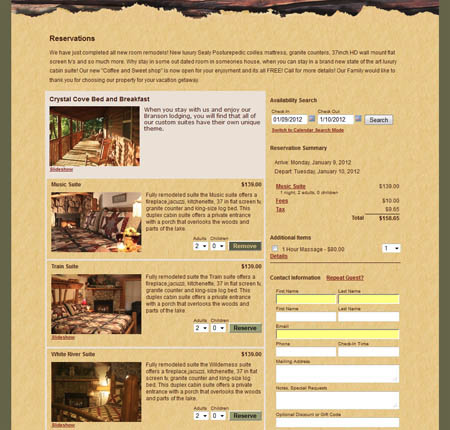
Finally, a bit off topic, but can’t resist, here is a screenshot of an integration we built recently for a new user:
Formatting instructions for importing reservation data:
When your reservation and guest data is properly formatted, it can be loaded into ReservationKey. Your data should be saved into a Microsoft Excel file according to the following specifications for the spreadsheet:
- Create one line per reserved room. For example, if the same guest reserved two rooms, there should be one line for each room, along with all their contact information on each line.
- In the Room column, make sure the room name is matches (or at least similar to the name of the room you set up in ReservationKey)
- Include the following required columns (use these labels as column headers):
- RoomName
- CheckInDate (date the guest arrives; MM/DD/YYYY)
- CheckOutDate (date the guest departs; MM/DD/YYYY)
- Include the following optional columns (use these labels as column headers):
- FirstName
- LastName
- FirstName2
- LastName2
- Address
- City
- State
- Zip
- HomePhone
- BusinessPhone
- CellPhone
- Notes
- NumberAdults
- NumberChildren
- TotalRoomPrice (do not include currency symbol; total room price for entire stay; we will divide this price by number of nights in order to get daily room price)
- TotalTaxes (do not include currency symbol)
- TotalDiscounts (do not include currency symbol)
- DescriptionDiscounts
- TotalItemsForSale (do not include currency symbol)
- DescriptionItemsForSale
- AmountPaid (do not include currency symbol)
- BookingDate (date reservation was first made; MM/DD/YYYY)F
Why You Should Import Your Data
Importing reservation and guest data when switching to ReservationKey ensures:
- Continuity of your booking history & guest profiles, key for reporting and loyalty programs reservationkey.com+9reservationkey.com+9reservationkey.com+9reservationkey.com+2reservationkey.com+2reservationkey.com+2.
- Saves hours by avoiding manual entry—our Excel/CSV import utility handles it automatically .
- Quick turnaround—once properly formatted, most imports are completed within 1–2 business days reservationkey.com.
What You Can Import
- Full reservation history: Past, current, future bookings in Excel/CSV files.
- Guest contact lists: If no reservation history exists, simply import contact details.
- Compatible with nearly any previous PMS—we can help build a custom import path if needed reservationkey.com+11reservationkey.com+11support.roomkeypms.com+11.
Formatting Requirements: Deeper Dive
File Types Accepted
- Excel (
.xlsx,.xls) or CSV formats only .
Reservation Data
- One row per room booking (multiple rows if the same guest reserved multiple rooms) reservationkey.com+1reservationkey.com+1.
- Required columns:
RoomName(must align with room setup in ReservationKey)CheckInDate,CheckOutDate(formatted as MM/DD/YYYY) reservationkey.com+12reservationkey.com+12reservationkey.com+12.
- Optional columns:
FirstName,LastName,Address,City,State,Zip,Country,Email,HomePhone/CellPhone,Notes,NumberAdults,NumberChildren,TotalRoomPrice,TotalTaxes,AmountPaid, plus custom fields likeReservationNotes,ContactNotes,Status, etc. reservationkey.com+1reservationkey.com+1.
Guest Contact Only Files
- Each guest on its own row with contact details. Optional fields mirror those above .
Avoid Common Pitfalls
- Limit import size to a few thousand records to maintain system performance documentation.accruent.com+4reservationkey.com+4reservationkey.com+4.
- Double-check field names and data types—even small typos in headers like
RoomNameor incorrect date formats can derail the import. - Skip currency symbols—fields like
TotalRoomPrice,AmountPaid,TotalTaxesmust be plain numbers . - Disable AVS country filter if handling non-U.S. credit cards (Settings → Account → Payment Form → AVS settings) reservationkey.com.
Your Import Workflow
- Prepare a clean
.xlsxor.csvfile. - Verify all headers (
RoomName, date columns, optional contact and pricing fields). - Clean data—strip currency symbols, check AVS filters, ensure date formatting.
- Upload via Settings → Import Data. Or email it to
support@reservationkey.comdocumentation.accruent.com+14reservationkey.com+14reservationkey.com+14reservationkey.com+4reservationkey.com+4reservationkey.com+4. - Activate subscription—data import completes only after trial-to-paid conversion .
- Review & support—our team reviews formatting and may suggest edits or setup fees if custom work is needed reservationkey.com.
- Import complete—most are done in 1–2 days, after which you’ll be notified .
Ready to Migrate? Let’s Go!
Start Your Free Trial Create your account today—no credit card required—to import your existing data into ReservationKey.
Contact Support
Need help formatting your file? Email support@reservationkey.com with your spreadsheet attached. We assist and double-check imports for you!
View Import Guide A full walkthrough with screenshots ensures your file is correctly prepared.