Automation | February 6, 2026 | 4 min read
Flexible Email Template Editing: Visual Editor, Raw HTML, and Legacy Support
ReservationKey now offers flexible email template editing, letting you use a visual editor, paste raw HTML from external tools, or continue working with the legacy editor—without breaking your templates.
Email templates are a core part of how ReservationKey communicates with guests, and we know that different users have very different needs when it comes to editing those templates. Some prefer a simple visual editor, while others want full control over their own HTML—often created in external email design tools.
To support all of these workflows, we’ve expanded and clarified the email template editing options in ReservationKey. This update gives you more control, better HTML preservation, and clear choices depending on how your templates are built.
Overview of the Available Editing Options
ReservationKey now supports three primary ways to edit email templates:
- New visual editor – simple, clean, and safe for basic templates
- Raw HTML editor (“Edit as HTML”) – ideal for externally built templates
- Legacy editor – still fully supported for existing templates
The system remembers which editor was last used for each template, so your content won’t be unintentionally modified.
Creating a New Email Template
When creating a brand-new email template, you’ll start in the new visual editor by default.
This editor is designed to be:
- Lightweight and clean
- Easy to use for basic formatting
- Resistant to breaking HTML structure
It works well if you’re creating templates directly inside ReservationKey and don’t need advanced layouts or complex markup.
Editing Templates with Raw HTML
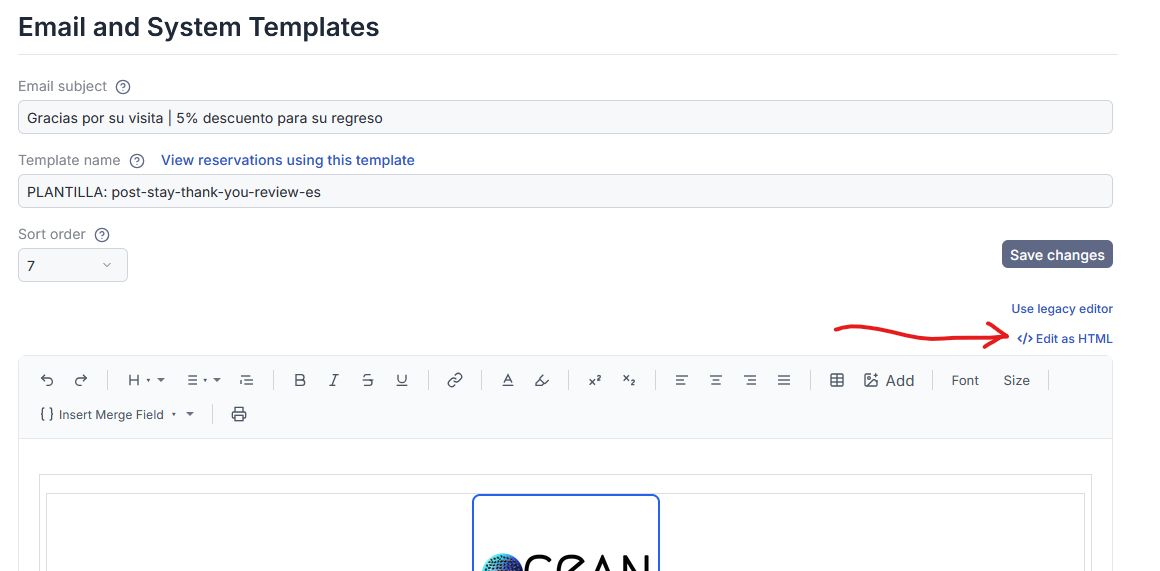
For users who build email templates outside of ReservationKey—using dedicated email template builders or custom HTML—the new “Edit as HTML” option is the key improvement.
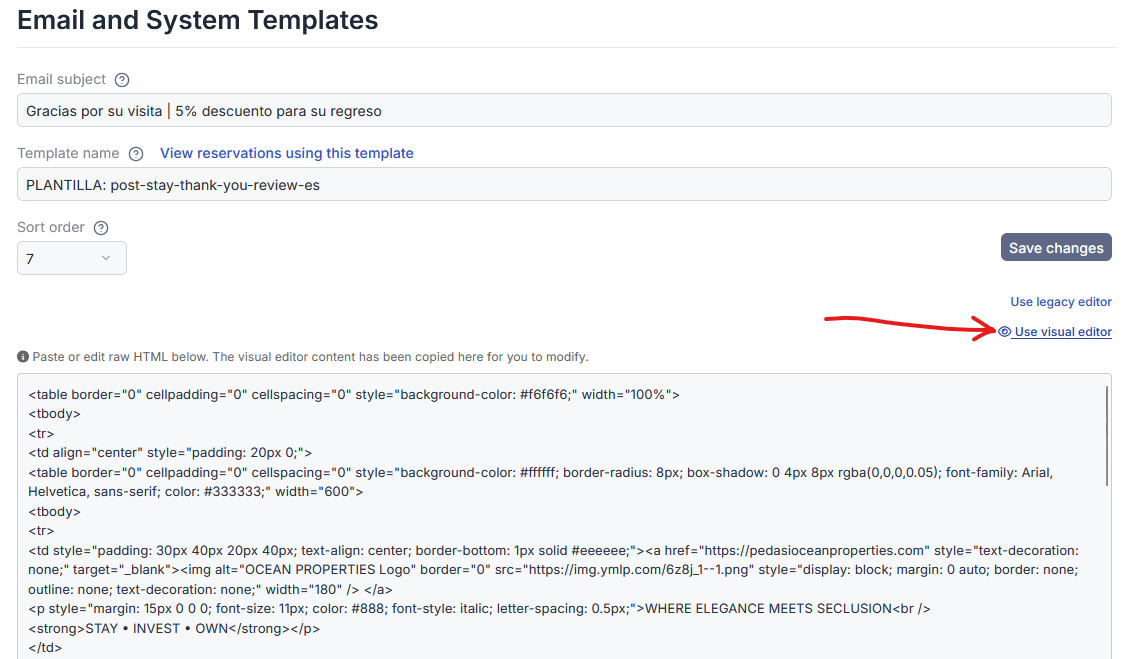
When you click Edit as HTML, the editor switches to a plain text HTML view. From here, you can:
- Delete the existing content
- Paste in your full HTML source
- Save without the system altering or simplifying your code
Once saved, ReservationKey remembers that this template is using the raw HTML editor, and future edits will return you directly to that same HTML view.
Preserving Your HTML Exactly as Written
When a template is saved using the raw HTML editor:
- The HTML is stored exactly as pasted
- No visual cleanup or restructuring is applied
- Editing the template again opens the same raw HTML view
This ensures that complex layouts, inline styles, and unsupported elements are preserved exactly as intended.
However, it’s important to understand what happens if you switch editors.
Switching Between Editors (What to Know)
If you switch from raw HTML to the visual editor, the visual editor may not support all HTML elements. In that case:
- Unsupported markup may be stripped
- The template may appear simpler
- Saving at that point will rebuild the HTML based on what the visual editor supports
If you switch back to Edit as HTML before saving, your original HTML is still intact. But once you save using the visual editor, the HTML will reflect that simplified structure.
The expanded preview view makes it easy to see exactly what is currently saved.
Editing Existing Templates (Legacy Editor)
For customers who were using ReservationKey before the new editor was introduced, existing templates continue to behave exactly as expected.
If a template was last saved using the legacy editor, the system remembers that and opens it the same way. The legacy editor still includes:
- A source view for editing HTML
- Support for more complex layouts
- Familiar behavior for long-time users
You can continue editing these templates without changing your workflow.
Moving from the Legacy Editor to the New Editor
If you decide to switch an existing template from the legacy editor to the new editor, you can do so manually by choosing Use New Editor.
From there, you still have the option to:
- Edit visually
- Switch to raw HTML
- Choose the workflow that best fits the template going forward
This gives you flexibility without forcing a migration.
Clear Options for Every Workflow
With these updates, ReservationKey now supports all common email-template scenarios:
- Use the new visual editor for simple templates
- Use raw HTML for externally built designs
- Continue using the legacy editor for existing templates
- Switch editors intentionally when needed
The system tracks your choice per template, helping prevent accidental changes.
Summary
These improvements are designed to make email template editing more predictable, flexible, and safe—especially for users working with custom HTML.
Whether you prefer a built-in editor or full control over your markup, ReservationKey now supports your workflow without forcing compromises.
If you have questions about which option is best for your templates, feel free to reach out.