ReservationKeyReservationKey
Pricing
DemoBook a DemoFree Trial
Log In
ReservationKey

Trusted by hospitality businesses since 2007

Founded in 2007, ReservationKey was created to offer a simple, yet powerful and affordable solution for managing reservations and displaying availability online. Our goal is to deliver top-quality software that fulfills our users' needs — simple, efficient, and budget-friendly.

Start Your Free TrialBook Your Demo

Solutions

  • Hotels & Motels
  • Bed & Breakfasts
  • Vacation Rentals
  • Resorts & Cabins
  • Campgrounds
  • Vehicle Rentals
  • Boats & Marinas
  • Ranches & Lodges

Resources

  • User Guide
  • Video Library
  • Blog
  • Terms of Service
  • Privacy Policy
  • Contact Us

Copyright © 2007 - 2026 ReservationKey, LLC - All rights reserved.

support@reservationkey.com|+1.415.800.4905

RESOURCE LIBRARY

ReservationKey Blog

Product updates, practical hospitality tips, and setup strategies from our team.

Browse by category or archive

Search

Categories

  • Operations (118)
  • Announcements (26)
  • Automation (20)
  • Payments (20)
  • Design (16)
  • Reporting (14)
  • Integrations (11)

Archive

2026
  • Flexible Email Template Editing: Visual Editor, Raw HTML, and Legacy Support
  • How to Modernize Your Existing Reservation Pages
  • New Modern Booking Page Themes
  • New Media Library for Image Management
  • Members-Only Booking Pages with ReservationKey
2025
  • Introducing V3: A Cleaner, Simpler, and More Modern Look for ReservationKey
  • Updated Availability Calendar Reports in ReservationKey
  • Details of ReservationKey’s New Referral Rewards Program
  • Introducing Our New AI Chat Support Tool: Faster Answers, Smarter Help
  • A Complete Guide to the New Reservations Tab in ReservationKey
  • How to Setup and Use Passkeys for Easy Logins
  • New Data Layer Makes it Easy to Add Reservation Data to Tracking Code
  • Creating a Custom Theme Tutorial
  • Adding Search Bar to WordPress / Elementor With ChatGPT's Help
  • Introducing Text Messaging
2024
  • New Slideshow Format Now Available
  • New Theme Available
  • New Sign-in Options
  • NEW: More control over iCal reservations
2023
  • UPDATED: PayPal Payment Method SmartButtons
  • NEW FEATURE: Currency Conversion Widget
  • NEW: Rate adjustments can be set to apply only for last minute reservations
  • NEW: Alert icons in Guests section
2022
  • NEW: Automatically Add QR Codes to Gift Certificates
  • NEW: Exclude dates from discount codes
  • Selling Gift Certificates with ReservationKey and Square
  • NEW: Set date range restrictions on fees.
  • NEW: Set default length of stay for booking engine
  • Square API Update News
  • NEW: Show Custom Fields Specific to Selected Rooms/Units
  • NEW: Electric Meter Calculator in Items for Sale
  • NEW: Password protect online reservation pages
2021
  • NEW FEATURE: Flag rooms as dirty or clean
  • NEW: Fully customizable internal contact form in Reservation Details, including set which fields are required
  • NEW: Online Check-in Form; Signature Fields; Image Uploads
  • Two new custom field types – image/document upload & signature pad
  • NEW: Make card-present transactions with Square Terminal
  • ReservationKey for a Boatel (boat-hotel) – interesting uses of the reservation software
  • Channex updates, news, pricing
  • Big Update to iCal – Cancellations and Modifications now possible; new “import all” options
2020
  • NEW: Reservation status can automatically change after X number of hours
  • Improvement to online reservations page functionality
  • Appointment Bookings & Book by Type Tutorial
  • Creating Clickable Maps to Show Availability
  • How to completely edit the waiting list/inquiry form and message.
  • NEW OPTION: Set default number of guests
  • NEW: Custom field for currently logged in user
  • NEW: Online Modifications (and Cancellations)
  • New Feature: Easily Set Weekly and Monthly Rates
  • Customizing the ReservationKey Booking Engine for Your Needs
  • Options for Offering Trip Insurance
  • NEW: Online cancellations
2019
  • Themes updated with gift certificate styling
  • eRentalLock integration
  • ORBIS Research notes ReservationKey a “key player” in our industry
  • Stripe Integration
  • NEW FEATURE: Stripe Integration
  • Expedia Integration Update
  • Just launched – Stripe Integration!
  • New Website Under Development
  • NEW: Use merge codes to add website messages to email templates
  • New Connection: Quickbooks Online – feeback/testing requested
2018
  • What steps should I take prior to “going live” with my new ReservationKey account?
  • Answer to commonly asked questions from clients coming from Webervations and Rezovations
  • NEW OPTION: Create a fee that is a percentage of the room price
  • IDEA: Creative placement of booking engine
  • Six New Reservation Page Themes
  • NEW: Select what payment category to use for initial online payments.
  • HOW TO CONVERT A TELEPHONE OR EMAIL INQUIRY INTO A BOOKING
  • NEW FEATURE: Set user permissions from within the room/unit settings
  • NEW: custom fields numbers drop down
  • NEW FEATURE: Multiple Rate Plans Per Room/Unit
  • NEW FEATURE: Daily Activity by clicking date bar
  • New: Drag and drop reservations
2017
  • Updated Correspondence Window
  • NEW ENHANCEMENT: Easily view your ADR and RevPar
  • NEW FEATURE: Click to call
  • NEW FEATURE: Change the order of guest names
  • NEW FEATURE: send email automatically when changing reservation status
  • NEW: Reports menu has been redesigned
  • NEW FEATURE: Track when emails were opened
  • NEW FEATURE: Set rates & minimum stay day by day in Rate Plans
  • New feature: include room/unit specific details in email templates
  • Introducing the new search bar
  • Floating top scroll bar & more dates
2016
  • Easier to select Rate Plans that Taxes and Fees apply to
  • New Feature: Bookkeeping
  • Under Development: Update to system look and feel
  • New Quick Quote Feature
  • Option to force new login for an account user
  • HTML Editor Added to Email Templates
  • Update to Google Analytics Tracking Options
  • Break Address Field into Multiple Fields
  • New Feature to Show Minimum Stay Requirements on Internal Calendar
  • New Option For Adding/Removing Emails to Queue
2015
  • Import Credit Card Details From Myallocator Now Available
  • New Option for Splitting Address into Multiple Fields
  • New option in Reservation Status to set rates to zero
  • Forum assistance: Improvements to Pre-Book Links
  • Forum assistance: Prebook Guests and Send a Link to Collect Reservation Details/Payment
  • Forum assistance: Now Specify Number of Children Per Room
  • Forum assistance: ReservationKey Change Log Added
2014
  • New Responsive Design for Reservation Details
  • A Couple New Permissions Settings
  • Payment Pages now include terms agreement section
  • New Authorize Only, Void, Capture options for authorize.net and RentPayment
  • Enhancement: Bulk Print Now Can Create and Email PDFs
  • NEW: Automatically track commissions due from myallocator.com bookings
  • Drag Across Dates to Select Multiple Days
  • Innrewards.com – new directory site created by ReservationKey users
  • Review of Forum Updates
  • Update Themes
  • New MyAllocator Option for Room Type Matching
  • MyAllocator Modifications
  • Time Zone Setting for Public Reservation Pages
2013
  • Enhancement: Reservations Tab Saves Search Settings
  • Advice on Vacation Rental Email Correspondence
  • TripAdvisor TripConnect Certification Complete
  • New Feature: Filter by Amenities in Online Reservation Pages
  • New Feature: Create Bookmarks, Notes in ReservationKey
  • New Feature: iCal Import and Export Links
  • Set up Reservationkey’s TripAdvisor TripConnect link
  • Enhancement: Balance shows in reservation info box; information about IE Compatibility View
  • New Feature: Reminders
  • Enhancement: Hover over stars to see description
  • New Feature: {{roomurl}}
  • Updates to User Community Forum
  • New User Forum
  • New Events Bar on Top of Internal Calendar
  • New Bulk Printing Option
  • New Occupancy and Tax Reports
  • New Features Update
  • New Partnership With Channel Management Company
  • CC and BCC fields added to Send option in Correspondence Button
  • Update to ReservationKey Facebook Apps
  • A Few Enhancements – Items for Sale and Min Stay Error Messages
  • Slight Change Calendar Header Functionality
  • Change Status/Add Star(s) Automatically if Discount Code Used or Item for Sale Added
  • New Mobile Version – Easy to Setup
  • Require Consecutive Night Stays
  • New Google Analytics Features
  • Link Email Messages to Payment Methods
  • Items For Sale Enhancement
  • More Status Options; Keeping Rates on Room Changes
  • Captcha Option for Gift Certificates
  • Color Code Units; Search by Room/Unit
  • New Features for Property Managers
  • New Option for Displaying Cancellation Policy
  • New Internal Availability Search Feature
2012
  • Happy New Year (and a few new features)!
  • Quicker Access to Calendar
  • Steps For Using Alternate Rate Plans
  • Update to Search Forms
  • New Features in Email Templates
  • Adding ReservationKey’s Online Bookings to Your Website
  • Getting The Most Out Of ReservationKey
  • New Option For Disabling Online Bookings
  • A Few Upgrades in Gift Certificates
  • Enhancements to the Correspondence Window
  • ReservationKey Is Also For Property Managers!
  • Option For Scrollbar at Top of Availability Calendar
  • Easier Linking Settings to Reservation Page(s)
  • New Statistics Report
  • Configuring ReservationKey for Hotels, Motels, Campgrounds
  • Easier Configuration for Hotels, Motels, Campgrounds
  • New Feature: Scheduled Emails
  • Changing/Moving Reservations Now Much Easier
  • Updates to Payments by Date Report
  • More Options in Email Templates
  • New Feature for Holding Rooms for Groups
  • Rate Adjustment Specials Now Show on Hotel Style Pages
  • Two New Email Template Codes
  • Using the Search Form and Iframes
  • All About PayPal Subscriptions For ReservationKey Service
  • Highlight Reservations By Adding a Star
  • A Few CSS Tweaks
  • Improvement on Retaining Prices When Changing Reservation Dates
  • Nice Review From a User
  • Thoughts on Phone Support vs Email
  • New Features in Activity Tab
  • Preference Setting For New Reservation Alert
  • More Flexibility Using Themes and Custom Text
  • Why Switch to ReservationKey?
  • New Color Coding in Activity Availability Search
  • NEW FEATURE: Create Custom Reservation ID Numbers
  • Added Status Column to Payments by Date Report
  • Clicking Payments Saves Credit Card Info
  • New Tax Option For VAT Included
  • New Flexibility in Taxes on Items for Sale and Fees
  • Press Enter To Search
  • New Option to Include Tax on Percentage Items for Sale
  • New Alert If Auto Payment Does Not Complete
  • Arrive Depart in Calendar Search Mode
  • New Guestbook Spam Prevention
  • New Internal Messaging System
  • Fees and Items for Sale Line Items
  • How to Create Dropdown Field for Check-in Time
  • New Tax Merge Codes in Templates
  • New Internal Title Field for Templates
  • No More Accidental Deletion of Admin User
  • Re-Designed Print Version of Housekeeping Reports
  • Updates on Features and News
  • Tips on Authorize.net Integration
  • New Yearly Comparison Report
  • More Ways to Find Reservations
  • Two New Income Reports
  • Alternate Payment Schedules
  • A Few New Features
  • ReservationKey Facebook Apps
  • Do You Need Your Own SSL Certificate?
  • Reasons Why People Switch to ReservationKey
  • San Poncho, Mexico – Best Clients Ever
  • Red Flag Guests / Set Alert
  • Monitor Searches on Reservation Pages
  • New Waiting List & Inquiry Form
  • Luxurious B&B In San Poncho, Mexico
  • Punta de Mita, Mexico – The Utmost in Relaxation
  • On The Road, in Puerto Vallarta, Mexico
  • Automatically Reduce Minimum Stays
  • Converting to ReservationKey – Importing Data
  • Happy New Year and A New Feature
2011
  • Hotel Style Reservation Pages
  • Data Backups
  • A New Blog
  • More Star Choices For Marking Reservations

Automation | February 6, 2026 | 4 min read

Flexible Email Template Editing: Visual Editor, Raw HTML, and Legacy Support

ReservationKey now offers flexible email template editing, letting you use a visual editor, paste raw HTML from external tools, or continue working with the legacy editor—without breaking your templates.

emailproduct-updatesthemes

Email templates are a core part of how ReservationKey communicates with guests, and we know that different users have very different needs when it comes to editing those templates. Some prefer a simple visual editor, while others want full control over their own HTML—often created in external email design tools.

To support all of these workflows, we’ve expanded and clarified the email template editing options in ReservationKey. This update gives you more control, better HTML preservation, and clear choices depending on how your templates are built.

Watch video

Overview of the Available Editing Options

ReservationKey now supports three primary ways to edit email templates:

  1. New visual editor – simple, clean, and safe for basic templates
  2. Raw HTML editor (“Edit as HTML”) – ideal for externally built templates
  3. Legacy editor – still fully supported for existing templates

The system remembers which editor was last used for each template, so your content won’t be unintentionally modified.

Creating a New Email Template

When creating a brand-new email template, you’ll start in the new visual editor by default.

This editor is designed to be:

  • Lightweight and clean
  • Easy to use for basic formatting
  • Resistant to breaking HTML structure

It works well if you’re creating templates directly inside ReservationKey and don’t need advanced layouts or complex markup.
Editing Templates with Raw HTML

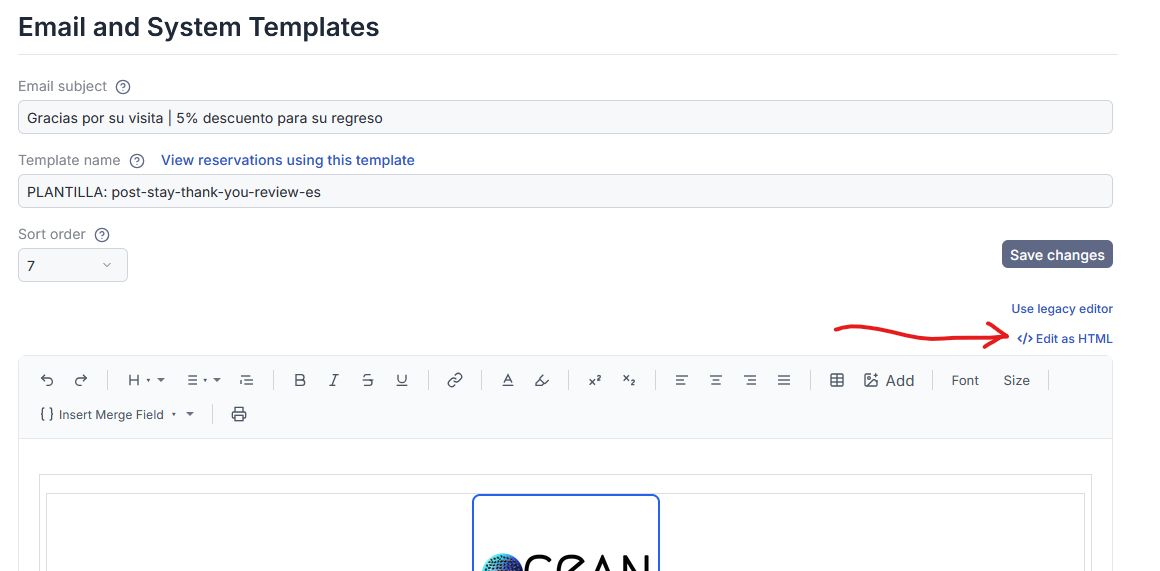
For users who build email templates outside of ReservationKey—using dedicated email template builders or custom HTML—the new “Edit as HTML” option is the key improvement.

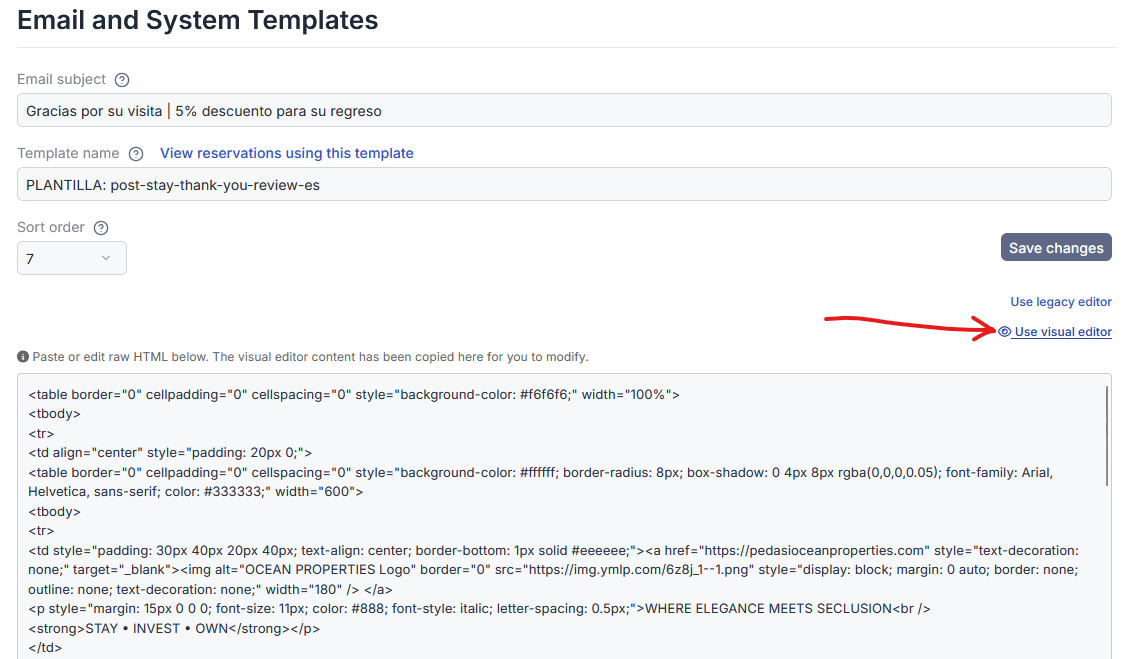
When you click Edit as HTML, the editor switches to a plain text HTML view. From here, you can:

  • Delete the existing content
  • Paste in your full HTML source
  • Save without the system altering or simplifying your code

Once saved, ReservationKey remembers that this template is using the raw HTML editor, and future edits will return you directly to that same HTML view.
Preserving Your HTML Exactly as Written

When a template is saved using the raw HTML editor:

  • The HTML is stored exactly as pasted
  • No visual cleanup or restructuring is applied
  • Editing the template again opens the same raw HTML view

This ensures that complex layouts, inline styles, and unsupported elements are preserved exactly as intended.

However, it’s important to understand what happens if you switch editors.

Switching Between Editors (What to Know)

If you switch from raw HTML to the visual editor, the visual editor may not support all HTML elements. In that case:

  • Unsupported markup may be stripped
  • The template may appear simpler
  • Saving at that point will rebuild the HTML based on what the visual editor supports

If you switch back to Edit as HTML before saving, your original HTML is still intact. But once you save using the visual editor, the HTML will reflect that simplified structure.

The expanded preview view makes it easy to see exactly what is currently saved.

Editing Existing Templates (Legacy Editor)

For customers who were using ReservationKey before the new editor was introduced, existing templates continue to behave exactly as expected.

If a template was last saved using the legacy editor, the system remembers that and opens it the same way. The legacy editor still includes:

  • A source view for editing HTML
  • Support for more complex layouts
  • Familiar behavior for long-time users

You can continue editing these templates without changing your workflow.

Moving from the Legacy Editor to the New Editor

If you decide to switch an existing template from the legacy editor to the new editor, you can do so manually by choosing Use New Editor.

From there, you still have the option to:

  • Edit visually
  • Switch to raw HTML
  • Choose the workflow that best fits the template going forward

This gives you flexibility without forcing a migration.

Clear Options for Every Workflow

With these updates, ReservationKey now supports all common email-template scenarios:

  • Use the new visual editor for simple templates
  • Use raw HTML for externally built designs
  • Continue using the legacy editor for existing templates
  • Switch editors intentionally when needed

The system tracks your choice per template, helping prevent accidental changes.

Summary

These improvements are designed to make email template editing more predictable, flexible, and safe—especially for users working with custom HTML.

Whether you prefer a built-in editor or full control over your markup, ReservationKey now supports your workflow without forcing compromises.

If you have questions about which option is best for your templates, feel free to reach out.

Back to all posts