ReservationKeyReservationKey
Pricing
DemoBook a DemoFree Trial
Log In
ReservationKey

Trusted by hospitality businesses since 2007

Founded in 2007, ReservationKey was created to offer a simple, yet powerful and affordable solution for managing reservations and displaying availability online. Our goal is to deliver top-quality software that fulfills our users' needs — simple, efficient, and budget-friendly.

Start Your Free TrialBook Your Demo

Solutions

  • Hotels & Motels
  • Bed & Breakfasts
  • Vacation Rentals
  • Resorts & Cabins
  • Campgrounds
  • Vehicle Rentals
  • Boats & Marinas
  • Ranches & Lodges

Resources

  • User Guide
  • Video Library
  • Blog
  • Articles
  • Onboarding Service
  • Terms of Service
  • Privacy Policy
  • Contact Us

Copyright © 2007 - 2026 ReservationKey, LLC - All rights reserved.

support@reservationkey.com|+1.415.800.4905

RESOURCE LIBRARY

  1. Home
  2. >Blog
  3. >ReservationKey vs. Mews: Why I Like to Keep Booking Simple

ReservationKey Blog

Product updates, practical hospitality tips, and setup strategies from our team.

Browse by category or archive

Search

Categories

  • Operations (119)
  • Announcements (30)
  • Automation (20)
  • Payments (20)
  • Design (16)
  • Reporting (14)
  • Integrations (11)
  • Hospitality Tips (2)

Archive

2026
  • ReservationKey vs. Mews: Why I Like to Keep Booking Simple
  • ReservationKey vs. WebRezPro: A Simpler Choice for Small Properties
  • Tracking ReservationKey Bookings as GA4 Ecommerce Purchases
  • Introducing the New ReservationKey Website Builder
  • Pricing & Configuration Just Got a Major Usability Upgrade
  • Scheduled Emails: Automated Guest Messaging with Better Visibility and Reliability
  • What's New in ReservationKey (April Update)
  • Flexible Email Template Editing: Visual Editor, Raw HTML, and Legacy Support
  • How to Modernize Your Existing Reservation Pages
  • New Modern Booking Page Themes
  • New Media Library for Image Management
  • Members-Only Booking Pages with ReservationKey
2025
  • Introducing V3: A Cleaner, Simpler, and More Modern Look for ReservationKey
  • Updated Availability Calendar Reports in ReservationKey
  • Details of ReservationKey’s New Referral Rewards Program
  • Introducing Our New AI Chat Support Tool: Faster Answers, Smarter Help
  • A Complete Guide to the New Reservations Tab in ReservationKey
  • How to Setup and Use Passkeys for Easy Logins
  • New Data Layer Makes it Easy to Add Reservation Data to Tracking Code
  • Creating a Custom Theme Tutorial
  • Adding Search Bar to WordPress / Elementor With ChatGPT's Help
  • Introducing Text Messaging
2024
  • New Slideshow Format Now Available
  • New Theme Available
  • New Sign-in Options
  • NEW: More control over iCal reservations
2023
  • UPDATED: PayPal Payment Method SmartButtons
  • NEW FEATURE: Currency Conversion Widget
  • NEW: Rate adjustments can be set to apply only for last minute reservations
  • NEW: Alert icons in Guests section
2022
  • NEW: Automatically Add QR Codes to Gift Certificates
  • NEW: Exclude dates from discount codes
  • Selling Gift Certificates with ReservationKey and Square
  • NEW: Set date range restrictions on fees.
  • NEW: Set default length of stay for booking engine
  • Square API Update News
  • NEW: Show Custom Fields Specific to Selected Rooms/Units
  • NEW: Electric Meter Calculator in Items for Sale
  • NEW: Password protect online reservation pages
2021
  • NEW FEATURE: Flag rooms as dirty or clean
  • NEW: Fully customizable internal contact form in Reservation Details, including set which fields are required
  • NEW: Online Check-in Form; Signature Fields; Image Uploads
  • Two new custom field types – image/document upload & signature pad
  • NEW: Make card-present transactions with Square Terminal
  • ReservationKey for a Boatel (boat-hotel) – interesting uses of the reservation software
  • Channex updates, news, pricing
  • Big Update to iCal – Cancellations and Modifications now possible; new “import all” options
2020
  • NEW: Reservation status can automatically change after X number of hours
  • Improvement to online reservations page functionality
  • Appointment Bookings & Book by Type Tutorial
  • Creating Clickable Maps to Show Availability
  • How to completely edit the waiting list/inquiry form and message.
  • NEW OPTION: Set default number of guests
  • NEW: Custom field for currently logged in user
  • NEW: Online Modifications (and Cancellations)
  • New Feature: Easily Set Weekly and Monthly Rates
  • Customizing the ReservationKey Booking Engine for Your Needs
  • Options for Offering Trip Insurance
  • NEW: Online cancellations
2019
  • Themes updated with gift certificate styling
  • eRentalLock integration
  • ORBIS Research notes ReservationKey a “key player” in our industry
  • Stripe Integration
  • NEW FEATURE: Stripe Integration
  • Expedia Integration Update
  • Just launched – Stripe Integration!
  • New Website Under Development
  • NEW: Use merge codes to add website messages to email templates
  • New Connection: Quickbooks Online – feeback/testing requested
2018
  • What steps should I take prior to “going live” with my new ReservationKey account?
  • Answer to commonly asked questions from clients coming from Webervations and Rezovations
  • NEW OPTION: Create a fee that is a percentage of the room price
  • IDEA: Creative placement of booking engine
  • Six New Reservation Page Themes
  • NEW: Select what payment category to use for initial online payments.
  • HOW TO CONVERT A TELEPHONE OR EMAIL INQUIRY INTO A BOOKING
  • NEW FEATURE: Set user permissions from within the room/unit settings
  • NEW: custom fields numbers drop down
  • NEW FEATURE: Multiple Rate Plans Per Room/Unit
  • NEW FEATURE: Daily Activity by clicking date bar
  • New: Drag and drop reservations
2017
  • Updated Correspondence Window
  • NEW ENHANCEMENT: Easily view your ADR and RevPar
  • NEW FEATURE: Click to call
  • NEW FEATURE: Change the order of guest names
  • NEW FEATURE: send email automatically when changing reservation status
  • NEW: Reports menu has been redesigned
  • NEW FEATURE: Track when emails were opened
  • NEW FEATURE: Set rates & minimum stay day by day in Rate Plans
  • New feature: include room/unit specific details in email templates
  • Introducing the new search bar
  • Floating top scroll bar & more dates
2016
  • Easier to select Rate Plans that Taxes and Fees apply to
  • New Feature: Bookkeeping
  • Under Development: Update to system look and feel
  • New Quick Quote Feature
  • Option to force new login for an account user
  • HTML Editor Added to Email Templates
  • Update to Google Analytics Tracking Options
  • Break Address Field into Multiple Fields
  • New Feature to Show Minimum Stay Requirements on Internal Calendar
  • New Option For Adding/Removing Emails to Queue
2015
  • Import Credit Card Details From Myallocator Now Available
  • New Option for Splitting Address into Multiple Fields
  • New option in Reservation Status to set rates to zero
  • Forum assistance: Improvements to Pre-Book Links
  • Forum assistance: Prebook Guests and Send a Link to Collect Reservation Details/Payment
  • Forum assistance: Now Specify Number of Children Per Room
  • Forum assistance: ReservationKey Change Log Added
2014
  • New Responsive Design for Reservation Details
  • A Couple New Permissions Settings
  • Payment Pages now include terms agreement section
  • New Authorize Only, Void, Capture options for authorize.net and RentPayment
  • Enhancement: Bulk Print Now Can Create and Email PDFs
  • NEW: Automatically track commissions due from myallocator.com bookings
  • Drag Across Dates to Select Multiple Days
  • Innrewards.com – new directory site created by ReservationKey users
  • Review of Forum Updates
  • Update Themes
  • New MyAllocator Option for Room Type Matching
  • MyAllocator Modifications
  • Time Zone Setting for Public Reservation Pages
2013
  • Enhancement: Reservations Tab Saves Search Settings
  • Advice on Vacation Rental Email Correspondence
  • TripAdvisor TripConnect Certification Complete
  • New Feature: Filter by Amenities in Online Reservation Pages
  • New Feature: Create Bookmarks, Notes in ReservationKey
  • New Feature: iCal Import and Export Links
  • Set up Reservationkey’s TripAdvisor TripConnect link
  • Enhancement: Balance shows in reservation info box; information about IE Compatibility View
  • New Feature: Reminders
  • Enhancement: Hover over stars to see description
  • New Feature: {{roomurl}}
  • Updates to User Community Forum
  • New User Forum
  • New Events Bar on Top of Internal Calendar
  • New Bulk Printing Option
  • New Occupancy and Tax Reports
  • New Features Update
  • New Partnership With Channel Management Company
  • CC and BCC fields added to Send option in Correspondence Button
  • Update to ReservationKey Facebook Apps
  • A Few Enhancements – Items for Sale and Min Stay Error Messages
  • Slight Change Calendar Header Functionality
  • Change Status/Add Star(s) Automatically if Discount Code Used or Item for Sale Added
  • New Mobile Version – Easy to Setup
  • Require Consecutive Night Stays
  • New Google Analytics Features
  • Link Email Messages to Payment Methods
  • Items For Sale Enhancement
  • More Status Options; Keeping Rates on Room Changes
  • Captcha Option for Gift Certificates
  • Color Code Units; Search by Room/Unit
  • New Features for Property Managers
  • New Option for Displaying Cancellation Policy
  • New Internal Availability Search Feature
2012
  • Happy New Year (and a few new features)!
  • Quicker Access to Calendar
  • Steps For Using Alternate Rate Plans
  • Update to Search Forms
  • New Features in Email Templates
  • Adding ReservationKey’s Online Bookings to Your Website
  • Getting The Most Out Of ReservationKey
  • New Option For Disabling Online Bookings
  • A Few Upgrades in Gift Certificates
  • Enhancements to the Correspondence Window
  • ReservationKey Is Also For Property Managers!
  • Option For Scrollbar at Top of Availability Calendar
  • Easier Linking Settings to Reservation Page(s)
  • New Statistics Report
  • Configuring ReservationKey for Hotels, Motels, Campgrounds
  • Easier Configuration for Hotels, Motels, Campgrounds
  • New Feature: Scheduled Emails
  • Changing/Moving Reservations Now Much Easier
  • Updates to Payments by Date Report
  • More Options in Email Templates
  • New Feature for Holding Rooms for Groups
  • Rate Adjustment Specials Now Show on Hotel Style Pages
  • Two New Email Template Codes
  • Using the Search Form and Iframes
  • All About PayPal Subscriptions For ReservationKey Service
  • Highlight Reservations By Adding a Star
  • A Few CSS Tweaks
  • Improvement on Retaining Prices When Changing Reservation Dates
  • Nice Review From a User
  • Thoughts on Phone Support vs Email
  • New Features in Activity Tab
  • Preference Setting For New Reservation Alert
  • More Flexibility Using Themes and Custom Text
  • Why Switch to ReservationKey?
  • New Color Coding in Activity Availability Search
  • NEW FEATURE: Create Custom Reservation ID Numbers
  • Added Status Column to Payments by Date Report
  • Clicking Payments Saves Credit Card Info
  • New Tax Option For VAT Included
  • New Flexibility in Taxes on Items for Sale and Fees
  • Press Enter To Search
  • New Option to Include Tax on Percentage Items for Sale
  • New Alert If Auto Payment Does Not Complete
  • Arrive Depart in Calendar Search Mode
  • New Guestbook Spam Prevention
  • New Internal Messaging System
  • Fees and Items for Sale Line Items
  • How to Create Dropdown Field for Check-in Time
  • New Tax Merge Codes in Templates
  • New Internal Title Field for Templates
  • No More Accidental Deletion of Admin User
  • Re-Designed Print Version of Housekeeping Reports
  • Updates on Features and News
  • Tips on Authorize.net Integration
  • New Yearly Comparison Report
  • More Ways to Find Reservations
  • Two New Income Reports
  • Alternate Payment Schedules
  • A Few New Features
  • ReservationKey Facebook Apps
  • Do You Need Your Own SSL Certificate?
  • Reasons Why People Switch to ReservationKey
  • San Poncho, Mexico – Best Clients Ever
  • Red Flag Guests / Set Alert
  • Monitor Searches on Reservation Pages
  • New Waiting List & Inquiry Form
  • Luxurious B&B In San Poncho, Mexico
  • Punta de Mita, Mexico – The Utmost in Relaxation
  • On The Road, in Puerto Vallarta, Mexico
  • Automatically Reduce Minimum Stays
  • Converting to ReservationKey – Importing Data
  • Happy New Year and A New Feature
2011
  • Hotel Style Reservation Pages
  • Data Backups
  • A New Blog
  • More Star Choices For Marking Reservations

Hospitality Tips | September 17, 2026 | 8 min read

ReservationKey vs. Mews: Why I Like to Keep Booking Simple

A real booking walkthrough shows why we keep ReservationKey straightforward: clear prices, easy room selection, and multiple rooms on one page.

software-comparisonbooking-enginedirect-bookingssmall-properties

We had a potential client come to us today who was using Mews, so I took this opportunity to walk through their booking process and compare it with ReservationKey. I like making these videos and blog posts around actual, real-life experiences, because it's often the little things you notice along the way that show how different two systems can feel.

For this comparison, I'm looking at one very specific piece of the puzzle: how complicated it may be for your guest to make a booking. It's a small part of the overall system, but I think it says quite a bit about why we like to keep things straightforward.

Your guest wants to see what's available, understand how much it costs, and make a reservation, and I think we should make that as simple as possible. As a property owner, you shouldn't have to take on an expensive, complicated system to give them that experience.

You can watch the full ReservationKey vs. Mews walkthrough here, and I've included screenshots from the recording below. This comparison follows the Mews setup I encountered and our ReservationKey example; other properties may have either system configured differently.

I just want to see the rooms

Starting on the property's website, I clicked Book Now, which opened a new tab and took me over to the Mews booking engine. Across the top were five steps: Dates, Categories, Rates, Summary, and Details. After entering my dates and number of people, I clicked Next and arrived at Categories, where I could see room photos and starting nightly rates, with a Show rates button to take me into the next step.

This is where I started finding the process a little more involved than I would like. As a guest, I don't really care about learning the system's categories; I just want to see the rooms and what my stay is going to cost. Having to work through that extra layer makes something pretty ordinary feel more complicated than it needs to be.
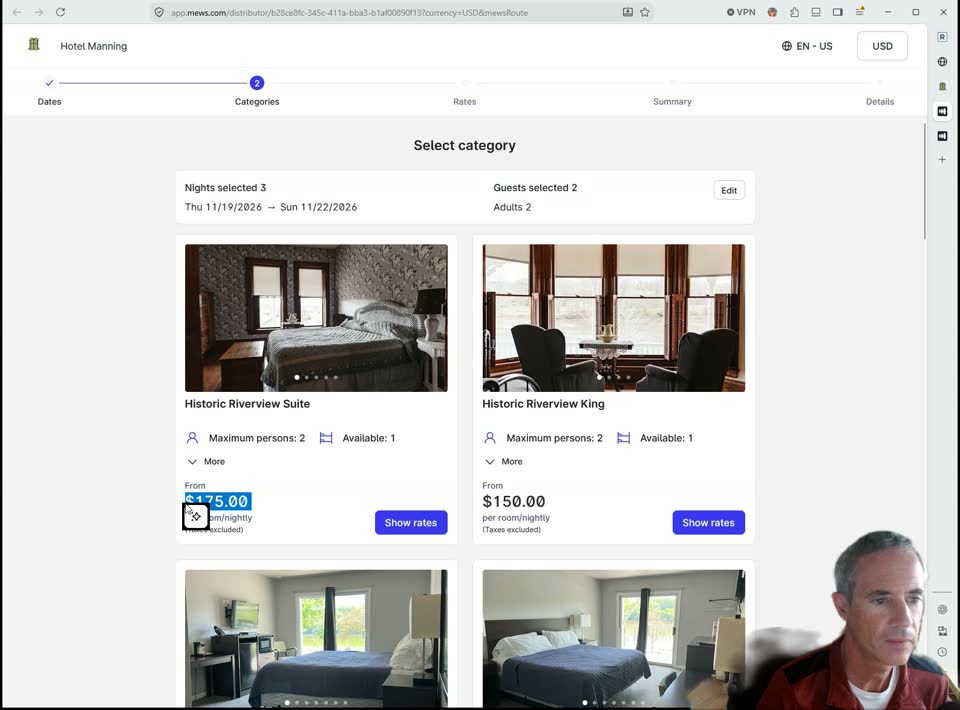
Mews booking engine showing the Categories step, starting nightly prices marked taxes excluded, and Show rates buttons

The Mews Categories screen in the walkthrough, at about 1:57. There are prices here, but they are starting nightly rates with taxes excluded.

Show me what I'm going to pay

That brings me to something I feel pretty strongly about: people should be able to understand the price while they're deciding what to book.

In the Mews example, I went through the room and rate selection before reaching the summary where I could see the total with taxes and the selected pet fee. By that point, I'd already made my selections, and I still needed to click Continue to reach the guest details page.

With the ReservationKey setup I demonstrated, the room list and reservation summary are on the same page, so selecting a room brings up the room charge, tax, and total alongside it. You can look at the nightly breakdown and review your selection while the other rooms are still visible. The idea is to keep the price right there as people build their reservation, so they can see what they're committing to as they go.
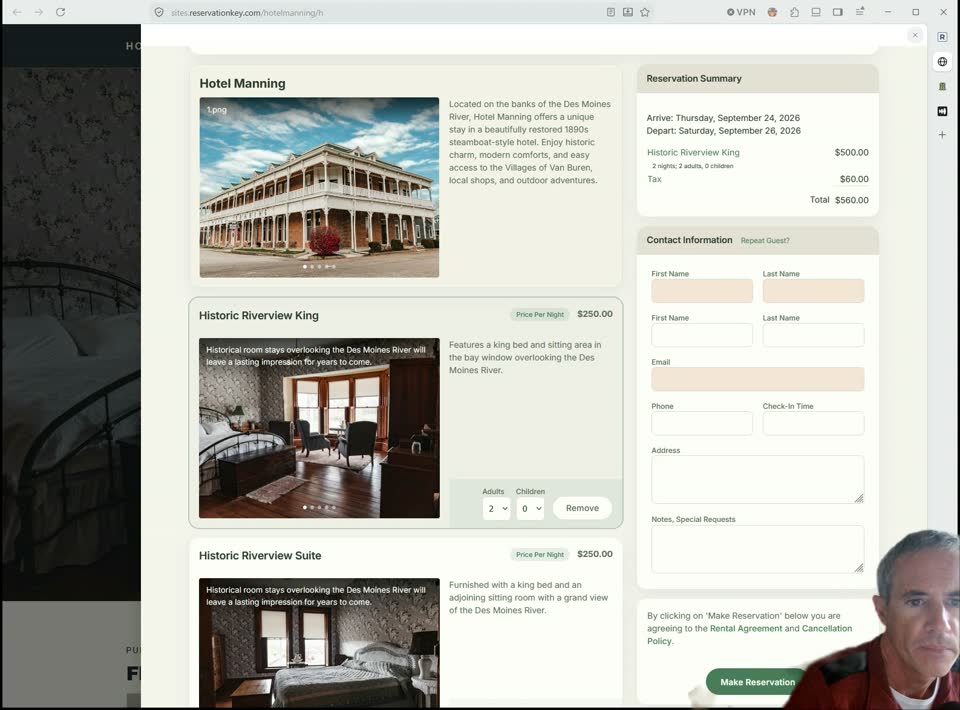
ReservationKey booking drawer with room choices on the left and a reservation summary showing room charges, tax, and total on the right

ReservationKey's booking drawer, shown near the start of the video. The selected room, tax, total, and guest information form are together. The two demonstrations use different dates; the dollar amounts are not a room-price comparison.

Want another room? Just add it

Partway through the Mews booking, I tried a very normal situation: our friends are coming with us, so we need another room.

The option I found was called “Add more stays,” although “Add more rooms” would have made more sense to me in this situation. Clicking it took me back from the summary to Categories, where I went through the category and rate selection again for the second room.

In ReservationKey, the available rooms are still right there, so I simply added a double room to the booking. It appeared in the reservation summary with the tax and total updated for both rooms, and I could carry on without going back through the earlier screens.

The whole idea from the beginning was one-page bookings, where you can choose your rooms, review the price, enter your information, and make the reservation in the same place. Adding another room should feel like a natural part of that process.

I hadn't connected a payment method in this demo, so you don't see a card payment being completed. Once a supported provider such as Stripe or Square is configured, guests can also enter their payment information and see the amount due when booking. If you offer optional items, such as a pet fee, those can be configured on the page as well.

Keep the booking right on your website

The same idea carries through to how guests reach the booking page. In the ReservationKey example, they can enter their dates right on the property's website, then click Search to open the booking engine in a drawer over that website with the dates already selected.

From there, they can read descriptions, look through photos, select rooms, and fill in their details without being sent off to a separate tab. I like that continuity because they've come to your website to book with you, and the reservation process feels like part of the site they're already using.

Prefer a calendar? We have that too

Some guests find it easier to look at a calendar and select the nights they want, and ReservationKey supports that approach as well. In the video, I switched to the calendar view and selected three rooms directly on the grid, with the reservation adding up as I made my selections. The rooms don't even have to be booked for the same number of nights, which is useful when people in the same party are arriving or leaving on different days.
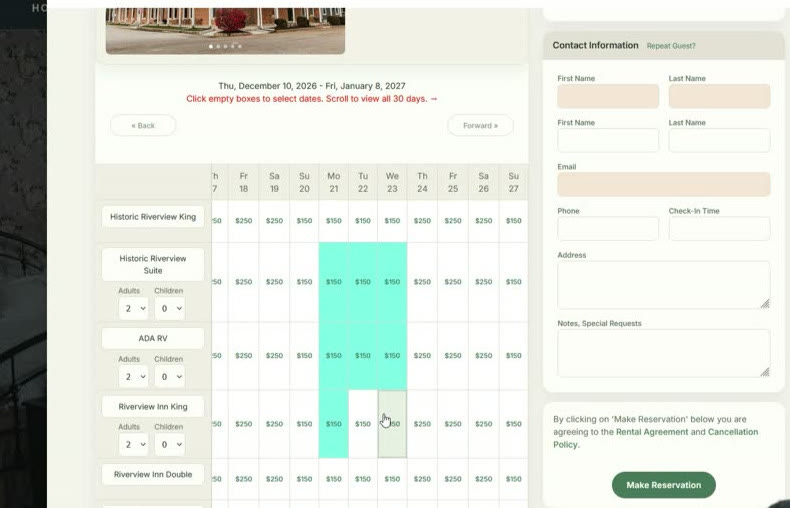
ReservationKey calendar booking view with three room rows selected for different lengths of stay and the guest information form beside the grid

The calendar option at about 7:36: select rooms and nights directly on the grid.

Once the reservation is completed, your calendar updates and confirmation emails go to you and your guest, keeping things straightforward on your side as well.

Make it clear which property they're booking

One other thing caught my attention as I looked through the Mews example: hotel rooms and cabins were listed together, and I couldn't tell whether the cabins were beside the hotel or somewhere else. If my friends were booking a hotel room and I chose a cabin, would we actually be staying near each other? As I said in the video, that booking page may have been configurable differently, but from what I was seeing as a guest, the answer wasn't clear.

In ReservationKey, you can make that distinction clear by setting up separate reservation pages for different properties or groups of units. We created one for the cabins and another for the main hotel, with each website button able to open the appropriate page in the booking drawer. That way, guests can go straight to the accommodation they're interested in and understand which property they're booking.
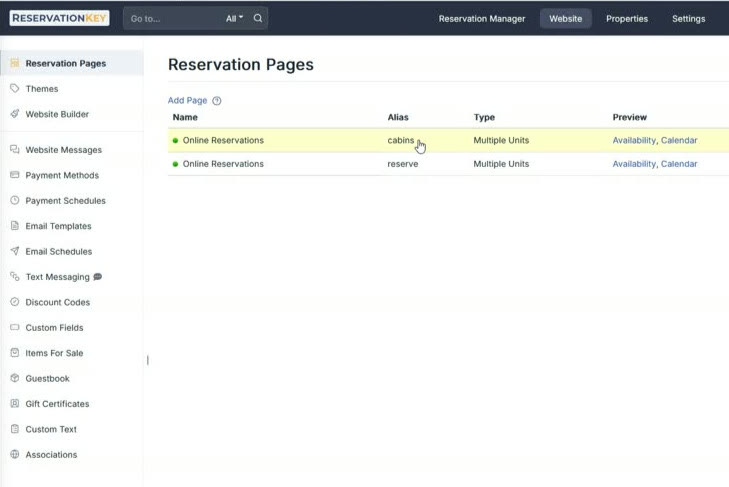
ReservationKey Reservation Pages settings showing separate booking pages with cabins and reserve aliases

The separate reservation pages shown at about 8:52. You choose which units belong on each page and give guests a clear route to the accommodation they want.

A straightforward system can be economical too

All of this comes back to what the independent properties we work with actually need. They want to manage reservations, take bookings from their website, and get on with running their property, and a straightforward system can do that without stretching the software budget.

Our published monthly software prices start at US$37 for up to four units, US$44 for up to ten units, and US$59 for up to twenty units. The booking engine is included, with no booking commissions or long-term contracts. Optional extras and payment-processing charges are additional.

Since Mews provides pricing tailored to the property, the best comparison is to put your own quote alongside our published pricing for the number of units you manage. I don't have a verified Mews quote for this example, so I can't give you an exact savings figure here.

What I would encourage you to do is look at the tasks you and your guests actually use, because you don't need to assume that a more expensive, more complicated system is what your property needs. If ReservationKey handles those tasks clearly and fits your budget, that's a very practical alternative.

Try making a booking yourself

If you're comparing ReservationKey with Mews, I encourage you to walk through the guest experience yourself. Pick some dates, select a room, check the taxes and total, and then try adding a second room for your friends. As you go, see how easy it is to understand where you are in the process and what happens next.

That's what I did in this video, and it's why I like our approach: everything stays simple and straightforward, even when you want to add another room or change your plans. Your guests already have plenty to think about when planning a trip, so booking the room should be the easy part.

You can start a free 30-day trial and walk through ReservationKey yourself to see how it would work for your property. We'd love to have you try it out.

Based on my September 17, 2026 walkthrough. Public software pricing checked the same day; prices and available options can change.

Back to all posts